> For the complete documentation index, see [llms.txt](https://doc.ave.ai/llms.txt). Markdown versions of documentation pages are available by appending `.md` to page URLs; this page is available as [Markdown](https://doc.ave.ai/tutorial/pc-web-tutorial/on-chain-trading/how-to-log-in-to-ave.ai.md).

# How to Log in to Ave.ai

<figure><img src="https://282307349-files.gitbook.io/~/files/v0/b/gitbook-x-prod.appspot.com/o/spaces%2FVhfw2n4uNr4o5eCyFsyK%2Fuploads%2FMDNkM5WvXpxo1gO7bOiU%2Fimage.png?alt=media&amp;token=0d9a6b14-6776-436b-b55a-e07edfde2a25" alt=""><figcaption></figcaption></figure>

Visit [ave.ai](https://ave.ai) and click "Connect" in the upper right. As one of the most professional and secure on-chain trading platforms, Ave.ai offers multiple wallet connection methods to begin your meme coin journey.&#x20;

1. **Create/Log In with Email (Recommended)**

You can register with an email and password to create an Ave.ai account. The platform will automatically set up **4 Bot Wallets** (Ethereum, BSC, Solana, and Base) linked to your account. Google login is also supported.

<figure><img src="https://282307349-files.gitbook.io/~/files/v0/b/gitbook-x-prod.appspot.com/o/spaces%2FVhfw2n4uNr4o5eCyFsyK%2Fuploads%2FwE1BRuyAVO6t5pXhZzdB%2Fimage.png?alt=media&amp;token=1e1f14f1-f3fa-4114-970a-319f59f61fed" alt=""><figcaption></figcaption></figure>

<figure><img src="https://282307349-files.gitbook.io/~/files/v0/b/gitbook-x-prod.appspot.com/o/spaces%2FVhfw2n4uNr4o5eCyFsyK%2Fuploads%2FvB0xD3cyBT9SyzVjV91B%2Fimage.png?alt=media&amp;token=f81daa4f-dcbd-40c3-bb83-489eabe292fa" alt=""><figcaption></figcaption></figure>

2. **Telegram Bot One-Click Login**&#x20;

If you’re already using the Telegram Ave Sniper Bot, you can link your account via Telegram. The PC site and the bot will share the same wallet address and sync trading data.

<figure><img src="https://282307349-files.gitbook.io/~/files/v0/b/gitbook-x-prod.appspot.com/o/spaces%2FVhfw2n4uNr4o5eCyFsyK%2Fuploads%2FDIY2FXOjGJsPrJzfsyev%2Fimage.png?alt=media&amp;token=a9c74eb3-060d-4906-8921-605c9339101b" alt=""><figcaption></figcaption></figure>

<figure><img src="https://282307349-files.gitbook.io/~/files/v0/b/gitbook-x-prod.appspot.com/o/spaces%2FVhfw2n4uNr4o5eCyFsyK%2Fuploads%2FaonMdROE2TIRxw3LosGI%2Fimage.png?alt=media&amp;token=012fe3f6-4742-4760-86cc-cd46f6432094" alt=""><figcaption></figcaption></figure>

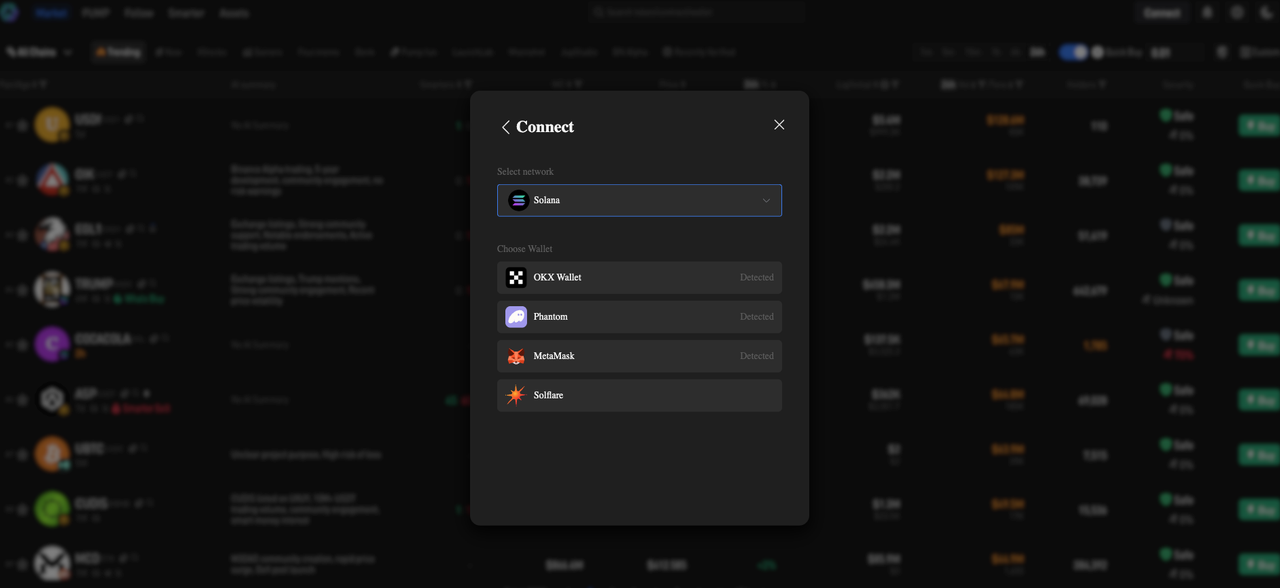
3. **Chrome Extension Wallet Login**&#x20;

Ave.ai also supports direct binding with browser-based wallets like:

* Binance Wallet
* OKX Wallet
* MetaMask
* Solana Wallets: Phantom, OKX, Solflare, Torus, Trust

<figure><img src="https://282307349-files.gitbook.io/~/files/v0/b/gitbook-x-prod.appspot.com/o/spaces%2FVhfw2n4uNr4o5eCyFsyK%2Fuploads%2F0fDqloUZfwhmN9c605o1%2Fimage.png?alt=media&amp;token=7342ec5c-9518-4b63-801e-090fe480de47" alt=""><figcaption></figcaption></figure>